


















Table of Contents
- • Piktochart Review Summary
- • About Piktochart
- • Other opinions about Piktochart
- • Piktochart Overview
- • Piktochart Review
- • Piktochart Pro Review
- • Piktochart Business Review
- • Piktochart Pros & Cons
- • Piktochart vs Canva
- • Features and Usage of Piktochart
- • Piktochart Subscription Plans and Pricing
- • Piktochart Return Policy
- • Piktochart Delivery Policy
- • How to Contact Piktochart
- • Where to buy Piktochart?
- • Conclusion of Piktochart reviews & ratings
Piktochart Review Summary
Piktochart is a web-based software tool focused on creating visually engaging infographics, reports, and presentations. It primarily serves non-designers and professionals who need efficient, data-driven visual content without extensive graphic design expertise. The platform generally performs well in usability and customer support but tends to have limitations in free-tier features and some AI-generated content accuracy, which may suit users valuing simplicity over versatility.
Highlights
- Best suited for professionals, educators, and non-designers seeking accessible, data visualization-focused design tools.
- Offers a broad range of templates, drag-and-drop editing, AI-powered content generation, and collaboration features within a streamlined platform.
- Trade-off includes limited free plan capabilities and occasional AI inaccuracies requiring manual adjustments.
- Overall Evaluation: 8.2/10, Solid mid-range option with strong usability but somewhat narrow scope.
Within the broader graphic design software landscape, Piktochart presents a specialized option that emphasizes core visual storytelling and data visualization. While alternatives like Canva or Visme offer a wider variety of creative tools, Piktochart's focused approach appeals to users prioritizing clarity and speed over extensive design flexibility. For a detailed breakdown, users can consult the Piktochart review to better align tool choice with their specific needs and workflows.
About Piktochart
Turning complex data into clear visuals can be a challenge without the right tools. Many users struggle with creating professional infographics and presentations quickly and intuitively.
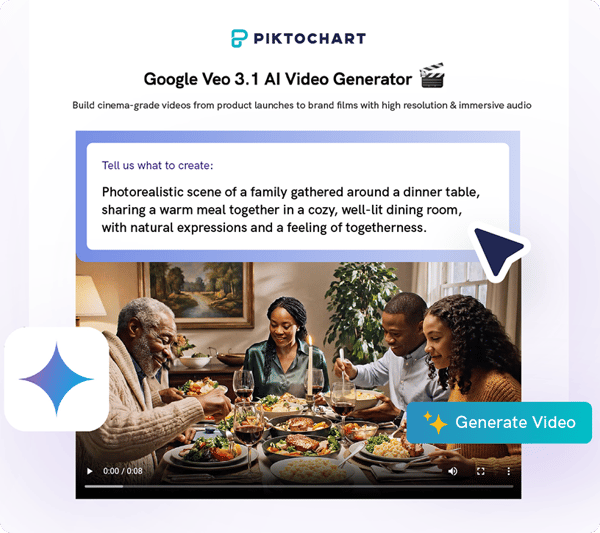
Piktochart is a web-based graphic design tool that focuses on easy creation of infographics, reports, and presentations. It serves professionals, educators, and marketers by transforming data and content into visual stories with user-friendly features and AI assistance. Piktochart fits into the mid-tier category of design platforms, emphasizing data visualization over extensive graphic design options.
The platform boasts over 14 million users and a solid 4.2 Trustpilot rating from 194 reviews. It has gained recognition for its intuitive interface and responsive customer service. Users appreciate its AI-powered tools and variety of customizable templates, though some note limitations in free-tier features and occasional AI inaccuracies. This balance highlights Piktochart's strong focus and adoption while indicating areas for improvement.
This Piktochart review examines how well the tool meets user needs in data-driven design. It discusses ease of use, feature strengths, and the trade-offs users face between accessibility and advanced functionality. The review guides readers in deciding if Piktochart aligns with their visual communication goals.
Other opinions about Piktochart
Opinions and insights gathered from trusted review articles and authoritative websites covering Piktochart.
Piktochart Overview
Piktochart is a web-based software platform focused on graphic design, specializing in infographics, presentations, and reports. Founded in 2012 by Goh Ai Ching and Andrea Zaggia in Malaysia, it operates as a cloud service for visual content creation utilized worldwide. Piktochart functions as a software vendor providing tools that do not require extensive design experience.
The company originated with a mission to simplify data visualization and empower users to transform complex information into clear visual stories. Over time, it has evolved by continuously enhancing its design templates and introducing AI-powered features to accelerate content creation. Its development reflects a strategic focus on combining ease of use with powerful visualization capabilities.
Piktochart serves over 14 million users globally, offering a scalable SaaS model with free and subscription tiers. It supports multiple industries by delivering intuitive tools for creating reports, marketing materials, and educational content. The platform maintains a significant footprint in online design software, integrating collaboration and brand management features suited for professional and enterprise use.
Piktochart Review
Piktochart is a versatile visual communication brand focused on simplifying the process of creating impactful infographics, presentations, and reports. It caters to a wide range of users from beginners to professionals, emphasizing user-friendly design and creative flexibility.

The brand offers a comprehensive platform equipped with an extensive library of customizable templates and AI-powered tools that accelerate content creation. Piktochart's technology supports seamless design workflows and enables users to generate visually engaging materials efficiently. Positioned as an accessible yet powerful visual storytelling solution, the brand serves educational, business, and marketing sectors alike.
Piktochart Highlights- Intuitive drag-and-drop design tools
- AI-enhanced content creation features
- Extensive template and design asset library
- Responsive and helpful customer support
- Strong brand reputation for accessibility and creativity
Piktochart Pro Review
Piktochart Pro is designed for professionals and small teams who require enhanced tools for frequent design tasks. It offers unlimited PNG downloads, access to a library of over 5 million premium icons and graphics, and 100GB of cloud storage to manage design assets efficiently.
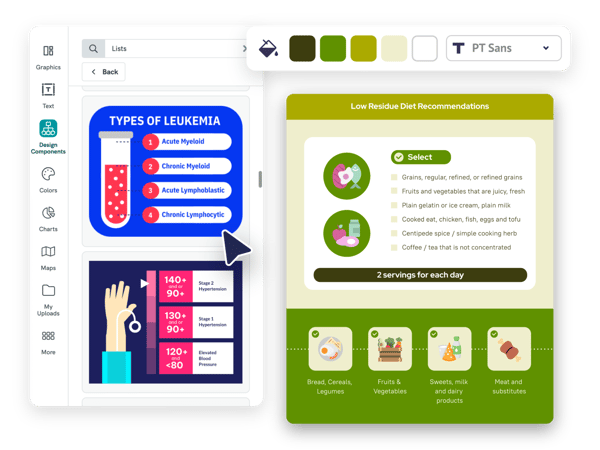
Advanced branding is supported through the ability to download images with transparent backgrounds, allowing for polished and customizable visual content. Additionally, the plan includes 500 monthly AI credits, which help accelerate the creation of refined visuals.
The cost is set at $14 per member per month, billed annually. This pricing structure targets users who need consistent access to advanced design features without subscription interruptions.
Price $14 • piktochart.com
Piktochart Business Review
The Piktochart Business plan is tailored for teams that need advanced brand management and efficient collaboration. It includes unlimited downloads in various formats such as PDF and PowerPoint, alongside a detailed brand kit for maintaining visual consistency. Users can also benefit from up to 250GB of storage to securely host their projects.

This plan supports workflow improvements by offering reusable branded templates that help maintain a professional look across all materials. Additionally, priority AI credits accelerate content creation, facilitating streamlined production of high-quality visuals at scale. These features work together to enhance productivity and brand coherence.
Priced at $24 per member per month, billed annually, the Business tier balances robust features with scalability for growing teams. The extensive storage and format options make it a practical choice for organizations seeking a comprehensive visual communication tool. This plan is positioned to meet the needs of enterprise-level collaboration and branding.
Price $24 • piktochart.com
Piktochart Pros & Cons
Piktochart offers a user-friendly drag-and-drop interface enhanced by AI-driven visual and content creation tools, making it accessible for users with varying skill levels. It includes a broad library of templates, icons, and images, along with strong data visualization options such as maps and charts, supporting diverse project needs. The platform also supports brand management and flexible collaboration features, benefiting team environments.
However, users should be aware that the free plan has limitations on downloads and storage, which may affect workflow for some. The AI tools, while powerful, sometimes require manual corrections to ensure accuracy. Additionally, there are policies regarding project deletion after the trial period that may cause inconvenience for certain users.
- • Intuitive drag-and-drop interface
- • AI-driven visual and content tools
- • Extensive template and icon library
- • Responsive customer support
- • Brand management features
- • Strong data visualization options
- • Flexible collaboration tools
- • Limited downloads and storage on free plan
- • AI accuracy needs manual corrections
- • Project deletion policy after trial
Piktochart vs Canva
Piktochart specializes in data visualization and infographics, making it an ideal choice for users focused on turning complex data into clear, visual stories. Canva, meanwhile, offers a wider range of graphic design tools and templates, suitable for general design projects beyond data representation.
Both platforms feature user-friendly interfaces, but Piktochart stands out with its AI-driven charting and mapping options, while Canva provides a larger library of design assets and seamless social media integrations. Pricing also differs, with Canva offering a more generous free plan and greater storage capacity, whereas Piktochart is tailored more towards professionals needing advanced infographic creation tools.
- Focus on data visualization and infographics
- AI-powered charting and map tools
- Optimized for professional infographic and report creation
- User-friendly interface
- Broad range of graphic design features
- Extensive asset library including templates and images
- Integrations with social media platforms
- More generous free tier and larger storage options
- User-friendly interface
Features and Usage of Piktochart
Piktochart allows users to easily create professional infographics, reports, presentations, and social media graphics using an intuitive editor with drag-and-drop functionality. The platform integrates AI-powered tools that convert text and data into polished visuals quickly. Users can customize layouts and incorporate elements such as charts, maps, and icons to enhance their designs.
Additional features include an extensive library of stock photos and icons, an AI design generator, and image editing tools. The Brand Kit helps maintain consistency, while the collaboration workspace supports sharing and commenting. This combination makes Piktochart suitable for educators, marketers, and data professionals who want to present complex information clearly and attractively.
Piktochart Subscription Plans and Pricing
Piktochart provides tiered subscription plans ranging from a free limited option to Pro, Business, and Enterprise levels, designed to accommodate different user requirements. The free plan includes access to basic tools and templates with restrictions on downloads and storage, while paid subscriptions offer unlimited downloads, expanded storage, AI credit usage, and advanced branding features.
Subscription benefits include access to premium templates, custom brand kits, and enhanced collaboration tools. Enterprise plans also offer priority support and training. Annual billing discounts are available, and specialized plans are offered for education and nonprofit organizations.
Piktochart Return Policy
The return policy details for Piktochart are not explicitly documented or readily available. Information regarding the specific time frame for returns or any applicable fees related to returns or cancellations is not provided. Generally, digital product terms are likely to apply, which may influence the ability to return or cancel purchases.
Typically, digital content such as subscriptions, downloads, and software licenses are excluded from returns. Customers are advised to consider this standard practice when making purchases, as returns or refunds for these types of products may not be offered or may be limited according to the terms of service.
Piktochart Delivery Policy
Piktochart delivers its digital services instantly through its online platform. Upon creating an account and activating a subscription, users gain immediate access to the software with no physical products involved. Delivery occurs entirely within the cloud, allowing users to start using Piktochart without delay from any location with internet connectivity.
Access to the service depends on an active subscription and internet connection. There is no shipping process, tracking, or delivery fees since all content is provided digitally. Users manage their account and software usage through the Piktochart dashboard and receive updates through their online profile.
How to Contact Piktochart
Piktochart offers several ways for users to get in touch for support or inquiries. Whether you have questions about your account, billing, or technical issues, you can reach out through the available contact methods.
- Email: [email protected]
- Help Center: Available on the Piktochart website for self-service support and resources
- Live Chat: Accessible on the website for real-time assistance
- Headquarters Address: 1-21-01, Suntech @ Penang Cybercity, Lintang Mayang Pasir 3, 11950, Bayan Baru, Malaysia
If you need help, contacting Piktochart support is straightforward through these channels. The customer service team is known for providing timely and professional responses to user inquiries.
Where to buy Piktochart?
When considering where to obtain Piktochart, the official website offers the most reliable source for the full suite of features, account management, and support services. Purchasing through piktochart.com ensures authenticity and transparent policies, which third-party marketplaces may not consistently provide. While the tool is primarily available online, potential buyers should be aware that offline retail options are not part of the standard distribution, so direct online access ensures the most up-to-date offerings and customer assistance.
Conclusion of Piktochart reviews & ratings
Piktochart stands out as a practical design tool for anyone looking to create clear and engaging visuals without needing advanced graphic skills. Its ease of use, reliable customer support, and strong focus on data visualization make it a popular choice.
If you're interested in exploring its capabilities, visiting the official website is a great next step. You can browse features comfortably and decide if it fits your needs. For further insights or to revisit important details, you can always return to this Piktochart review to guide your decision.
Editorial notes reflect aggregated buyer feedback and our independent editorial review of publicly available information. They are for informational purposes only and do not constitute endorsements. Purchases are made at your own discretion, and we are not responsible for transactions or outcomes related to this store. Experiences may vary. This content is assisted by AI and reviewed by our editorial team. While we strive for accuracy, AI-supported information may not always be 100% precise, so please verify any critical details.

